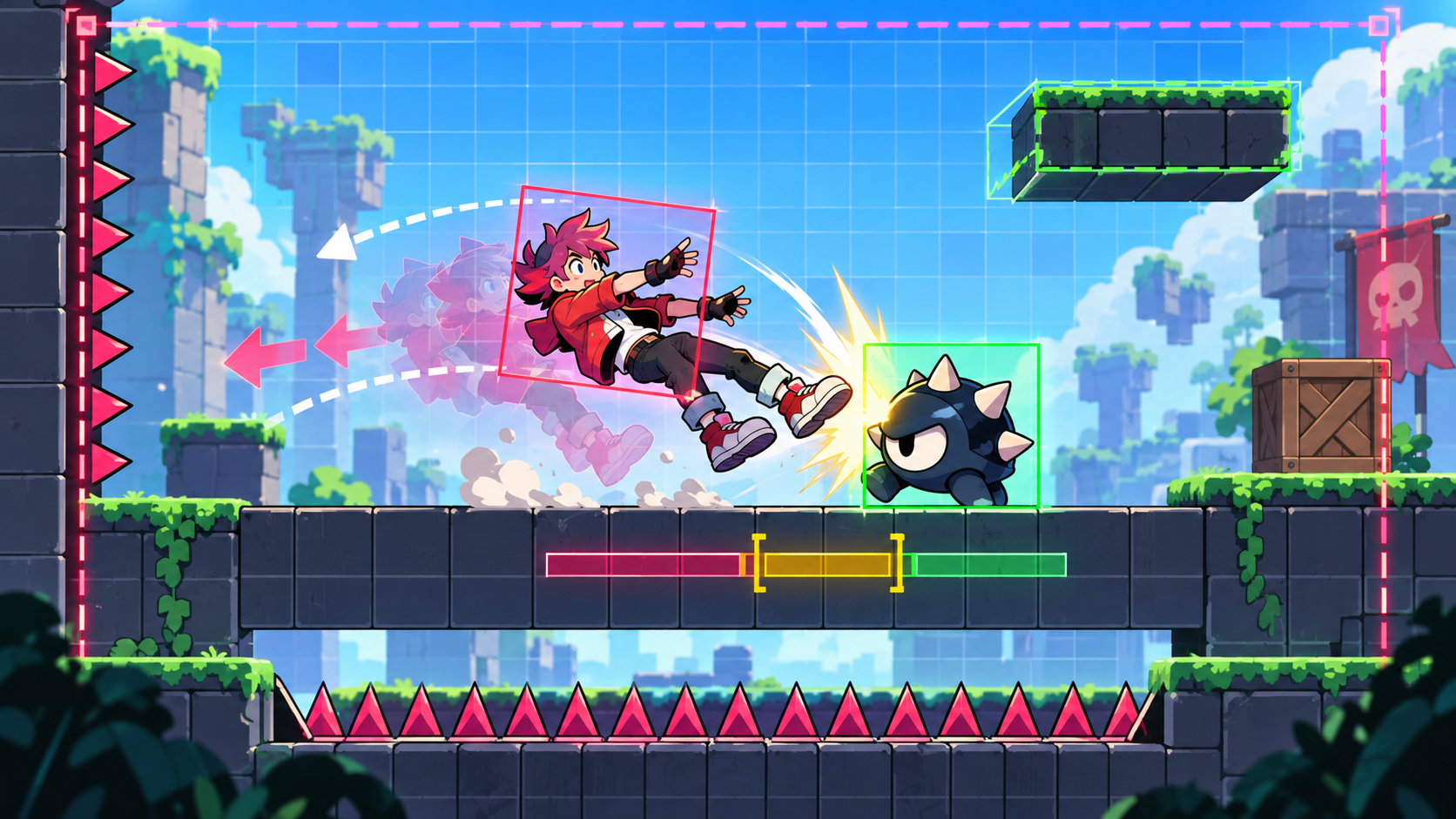
To vibe code knockback in a 2D game prototype, prompt the contact direction, shove distance, stun time, wall result, and recovery control in one tiny enemy room. Knockback should teach spacing. If it only throws the player across the screen, it is noise with a health bar.
Knockback gets treated like polish because it looks loud. A hit lands, the character flies back, the screen shakes, and everyone nods like combat got better. Then you play it twice and realize the enemy is still vague. The shove just made the vagueness travel farther.
Your first playable needs a smaller question: after contact, does the player understand what happened, where danger is, and when they can move again?
This is a first-playable workflow piece for 2D browser prototypes and small-engine drafts. Phaser is cited for arcade physics velocity and overlap context. Godot is cited for CharacterBody2D motion and collision behavior. GDevelop is cited for platformer behavior controls. MDN is cited for 2D collision detection basics.
Godot
A general game engine where CharacterBody2D movement, collision response, and state flags can tune knockback by hand.
GDevelop
A no-code and low-code builder where platformer behavior, forces, timers, and variables can test stun and recovery timing.
Phaser
A JavaScript framework for browser prototypes where arcade physics velocity, overlap checks, and collision groups can make contact rules visible.
MDN Game Development
A practical reference for browser game basics, including 2D collision detection concepts that matter before you tune impact feel.
A Big Shove Can Hide a Bad Hit
The lazy prompt is easy: "Add knockback when the enemy hits the player." You will probably get a character launched backward, maybe with a flash and a few invincibility frames. That can look fine in a clip. It often plays like a coin toss.
Good knockback answers four things fast. Which direction did the hit come from? How much space did the player lose? Can they recover before the next threat? Did the wall, ledge, or hazard make the hit scarier in a fair way?
If knockback does not teach the player where they stood wrong, it is just punishment with travel time.
Weak Prompt vs Knockback Prompt
| Prompt shape | Likely result | Sharper version |
|---|---|---|
| Add enemy knockback | The player gets shoved an arbitrary distance after contact | When the slime touches the player, push the player 80 pixels away from the slime, lock attack input for 0.25 seconds, then restore movement before the slime can hit again |
| Make hits feel stronger | More screen shake and less control | Keep the shove short, add a clear flash, and make the recovery window visible with a brief blinking state |
| Add more enemies | A room where chained knockback feels cheap | Use one enemy, one wall, one spike gap, and one recovery zone before adding a second attacker |
| Make combat harder | The player loses control without learning spacing | Let wall hits stop the shove and drop the player into a short recovery, but never into instant repeated damage |
Prompt One Enemy, One Wall, One Bad Place to Stand
Do not test knockback in an empty rectangle. It needs geometry. Put one enemy near a wall, one small hazard near the wrong landing spot, and one safe recovery pocket. Now the shove has meaning.
The first room should be ugly and honest. Use placeholder sprites. Show hitboxes if your tool can. Put a restart key on the screen. Then play until you can name the mistake that caused each hit.
Directional shove
Push the player away from the enemy position, not always left or right.
If direction flips late or reads backward, contact will feel broken even when the math is correct.
Recovery window
Give the player a short stun, then a clear moment where movement comes back before danger repeats.
Too much stun feels like losing a turn. Too little stun makes the hit unreadable.
Wall stop
Let walls interrupt the shove so the player does not jitter, clip, or bounce forever.
If a wall turns one hit into three, fix damage rules before adding enemies.
Hazard landing
Place a spike, pit, or enemy patrol where reckless spacing can send the player.
The hazard must be visible before the hit. Hidden punishment is not learning.
Make Recovery Playable, Not Decorative
Recovery is where knockback becomes a game. The player should regain a small amount of control soon enough to steer away from the next problem. If they cannot affect the outcome after the shove starts, you are testing physics, not decisions.
A useful prompt gives the AI exact rules: horizontal shove, short stun, temporary invulnerability, wall stop, no repeated damage during blink, and restored control before the enemy attacks again. That is not over-specifying. That is protecting the loop from mush.
- The hit direction matches the enemy position at contact.
- The shove distance is short enough that the player can read the result.
- The stun time is visible and does not last longer than the lesson needs.
- Walls stop or redirect the shove cleanly without repeated damage.
- Hazards near the landing spot are visible before contact.
- Temporary invulnerability prevents unfair hit chains.
- A tester can explain why they got hit after one or two attempts.
Shove distance
The hit reads clearly but moves the player too little or too far.
Setting the spacing lesson without stealing the whole room.Stun length
Players understand the contact but cannot recover in time.
Balancing impact against agency.Invulnerability time
One mistake turns into repeated contact damage.
Stopping cheap chains while keeping danger meaningful.Enemy reset
The enemy keeps attacking during the player recovery state.
Making the next decision fair instead of automatic.FAQ
How do I vibe code knockback in a 2D game prototype?
Prompt one enemy room with contact direction, shove distance, stun time, wall behavior, temporary invulnerability, and a recovery window. Test whether the player understands the hit and can act before the next threat.
Should knockback always push the player backward?
It should usually push away from the source of contact. Fixed left or right shove rules break quickly when enemies approach from different sides.
What should I test before adding more enemies?
Test one enemy, one wall, one visible hazard, and one safe recovery pocket. If that hit does not read cleanly, more enemies will only multiply the confusion.